These records were just changed in another tab or by another visitor.Reload to see the latest
ANU Degree Planner
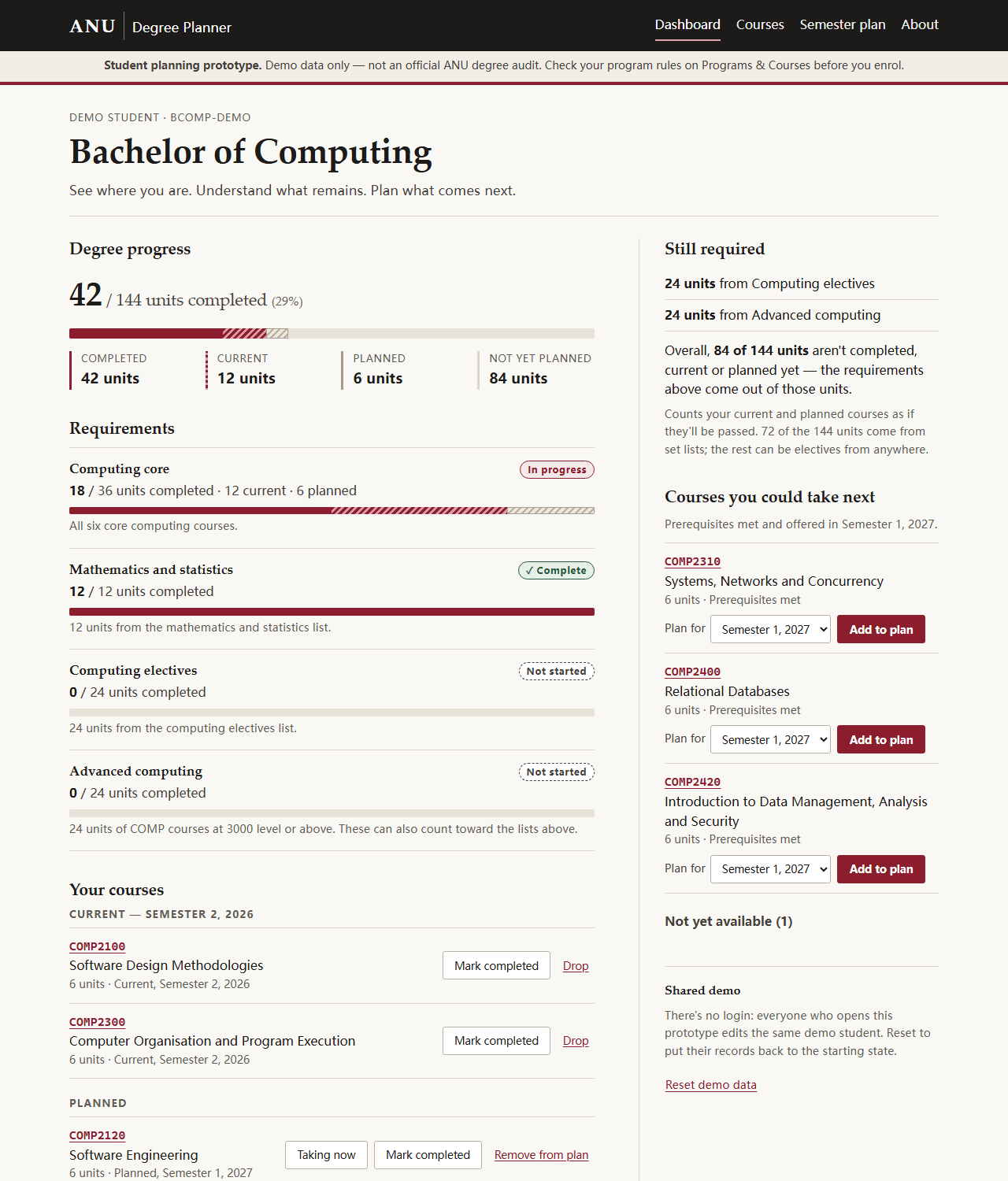
ANU Degree Planner is a prototype full-stack student planning system: one page that shows a student how much of their degree is done, which requirements are still open, and which courses they could take next, and lets them record courses as completed, current or planned. Every change goes to a SQLite database on the server and is still there after a reload. It’s the ANU system I wish existed, built as a small vertical slice for COMP4020 crit 7.
This is not an official ANU degree audit. It models one demo student in one simplified demo degree. Course codes and titles follow ANU’s; the prerequisites, semester offerings and degree rules are simplified for the prototype. Programs & Courses is the source of truth.
The problem
ANU students can look up any single course or degree rule, but nothing puts the pieces together. To answer “how far through am I, what do I still need, and what should I take next semester?” you read the degree’s requirements on Programs & Courses, check your academic record, look up each candidate course’s prerequisites one page at a time, and do the arithmetic yourself. The planner does that arithmetic from your records and keeps your plan.
The core workflow
- Open the dashboard: units completed out of 144, progress on each requirement, what’s still required, and courses you could take next.
- Pick a course — from the dashboard’s suggestions or the course catalogue — and add it to your plan for an upcoming semester (or mark it current, or completed).
- The browser submits a plain HTML form to the server; the server writes the change to SQLite and redirects back.
- The page re-renders from the database: the course is in your plan, and the progress bars, requirement states and suggestions have recalculated.
- Reload — or restart the server — and the change is still there.
Pages:
- Dashboard (
/) — degree progress, requirements, your courses, still required, courses you could take next. - Courses (
/courses/) — the demo catalogue, with search and filters by level, semester and your standing (prerequisites met, missing, planned, current, completed); each course has its own page with its prerequisites, what it leads to, and which requirements it counts toward. - Semester plan (
/plan/) — planned courses semester by semester, with unit totals, a flag for loads above 24 units, and warnings when a prerequisite is planned too late or a course is planned in a semester it doesn’t run in.
What good looks like here
A student should understand where they stand within seconds of opening the dashboard, and be able to make at least one meaningful planning change that persists in the database. Concretely, I held the work to these:
The database is the only source of truth. The schema
(src/lib/schema.ts) has eight relational tables — degrees, courses, course
offerings, prerequisites, degree requirements and their course lists,
students and the student’s course records — built by committed Drizzle
migrations with foreign keys and CHECK constraints. Nothing the pages show
is stored as a derived value or typed into a page: units completed, units
remaining, requirement progress, percentages, a course’s level and whether
it’s eligible are all computed from rows on each request, in one pure module
(src/lib/planner.ts).
Real persistence, no client-side state. Every change is an HTML form POST followed by a redirect, so the app works with JavaScript off, and a reload always shows what’s in SQLite. The only client script listens on a server-sent-events stream and offers a reload when the records change in another tab.
Honest about what it isn’t. Every page carries the prototype notice. Planning warnings are information, not enforcement. The demo data is small on purpose: nineteen courses, four requirements, direct prerequisites only.
Accessible by construction. One heading per page, labelled controls, buttons that name their course for screen readers, visible focus, and no information carried by colour alone: every bar has the same numbers beside it in text, and every status has words.
What’s enforced, and what’s judgement:
- Enforced by tests (
spec/, run bypnpm check): a planned course is still planned after a reload; completing a course recalculates units and requirement progress; courses with unmet prerequisites aren’t suggested; catalogue filters, plan warnings, bad input, cross-site POSTs and the SSE broadcast behave; the derivations are right on hand-built edge cases; and every page passes the axe accessibility floor and the course’s structural invariants. - Enforced by the harness (
CLAUDE.md): the rules above, as instructions the coding agent works under. - Judgement: whether the dashboard really answers “where am I?” at a glance, the visual design, and colour contrast (which the automated axe run can’t check without a real browser).
What I chose not to build: logins, real ANU data or integration with ANUHub, Canvas or Programs & Courses, the full prerequisite grammar (or-groups, co-requisites, incompatibilities, unit thresholds), recommendations beyond “prerequisites met and offered next semester”, and drag-and-drop planning. A small complete product beat a large incomplete one.
Prototype limitations
- One shared demo student. There’s no login, so everyone who opens the deployed prototype edits the same records. The dashboard has a “Reset demo data” button that restores the starting state.
- One demo degree, simplified. The Bachelor of Computing here is shaped like an ANU computing degree but its rules are invented for the demo. A course can count toward more than one requirement (a 3000-level elective counts toward both the electives list and the advanced-computing requirement), which is how level requirements overlap in real degree rules, but real rules have much more to them.
- Direct prerequisites only, and a current course counts as meeting a prerequisite for next semester.
- The current semester is fixed at Semester 2, 2026, so the demo data stays coherent.
Running it
pnpm install          # on a machine without make: pnpm install --ignore-scripts
pnpm dev              # http://localhost:4321
pnpm check            # typecheck, build, and the whole spec against the built server
The database is .data/app.db locally and /data/app.db on the Fly
volume. Migrations in drizzle/ apply when the server boots, and the demo
data is inserted into an empty database; there’s no separate setup step.
To change the schema: edit src/lib/schema.ts, run pnpm db:generate, and
commit the migration it writes.